Can You Build a Good Gaming PC for $1000 in 2026?
Yes, a $1000 gaming PC in 2026 can deliver excellent 1080p and strong 1440p gaming performance. With modern processors, DDR5 memory, and a capable graphics card, gamers can enjoy both competitive and AAA titles without needing a high-end budget.
How Do You Achieve Building $1000 Gaming PC?
Let’s proceed to building a gaming PC no longer has to cost a fortune.
A few years ago, spending under $1000 often meant making major compromises. In 2026, things look much better. Hardware prices have stabilized, newer processors are more efficient, and gamers can get excellent performance without crossing the four-figure mark.
If you’re looking for the best gaming PC build 1000 budget setup, then you’re in the right place.
This guide focuses on maximizing gaming performance while keeping the total cost around $1000. Whether you enjoy competitive shooters, RPGs, racing games, or open-world adventures, this build delivers strong performance for years to come.
Why a $1000 Gaming PC Is the Sweet Spot
Many gamers ask whether they should spend $700, $1000, or $1500.
The truth is that $1000 sits in a perfect middle ground.
You get:
- Strong 1080p gaming performance
- Excellent 1440p gaming capability
- Fast SSD storage
- Future upgrade options
- Modern platform support
- Better value than many prebuilt PCs
For most gamers, spending beyond this budget offers diminishing returns.
Best Gaming PC Build 1000 Budget for 2026
Processor (CPU)
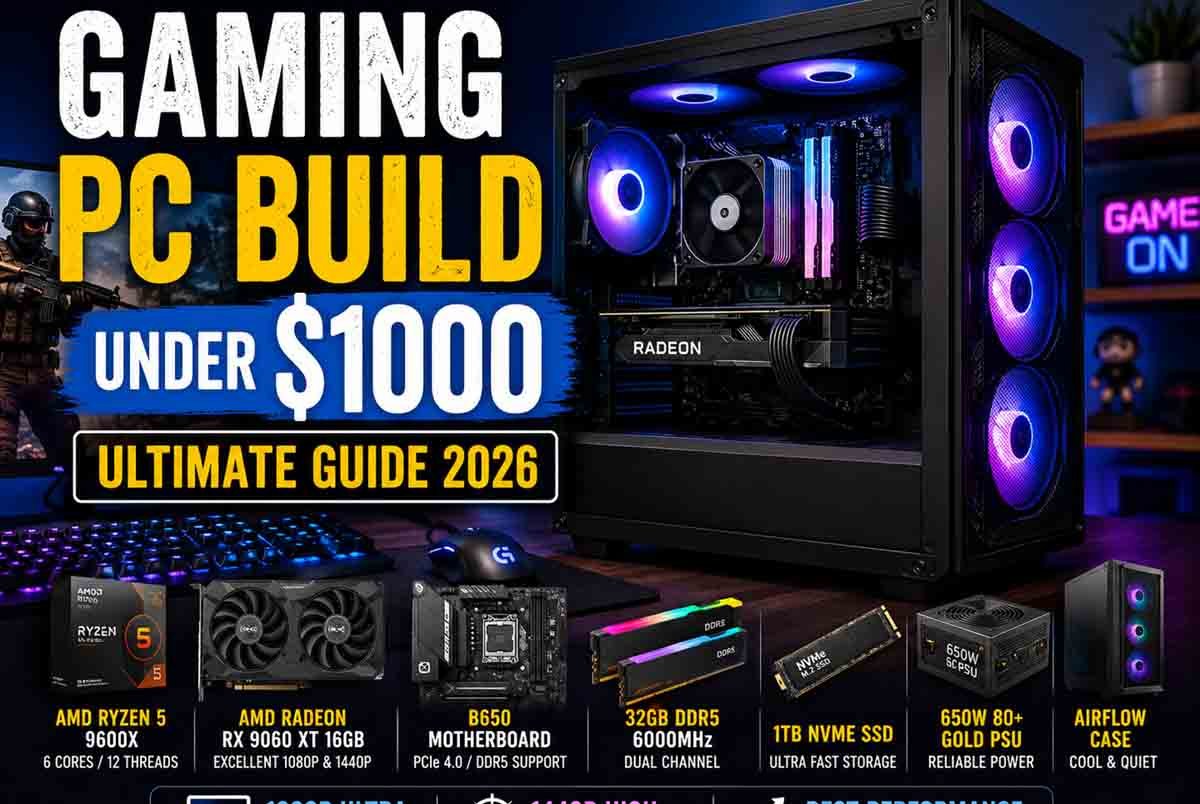
AMD Ryzen 5 9600X
The Ryzen 5 9600X offers excellent gaming performance while remaining power efficient.
Why it’s a great choice:
- 6 cores and 12 threads
- Strong single-core performance
- Excellent gaming benchmarks
- Supports modern AM5 platform
Approximate Price: $250 or less
Graphics Card (GPU)
AMD Radeon RX 9060 XT 16GB
The graphics card is where most of your gaming performance comes from.
The RX 9060 XT provides:
- Excellent 1080p Ultra performance
- Strong 1440p performance
- Large 16GB VRAM buffer
- Better longevity for future games
Approximate Price: $350
Motherboard
B650 Motherboard
A quality B650 motherboard provides everything most gamers need.
Look for:
- PCIe 4.0 support
- Multiple M.2 slots
- DDR5 compatibility
- Wi-Fi support if needed
Approximate Price: $120 (may differ)
Memory (RAM)
32GB DDR5 6000MHz
Many modern games benefit from faster memory and larger capacities.
Recommended:
- 32GB capacity
- DDR5-6000 speed
- Dual-channel configuration
Approximate Price: $90
This one is pricier but worth considering.
Storage
1TB NVMe SSD
Game sizes continue to grow every year.
A fast NVMe SSD helps with:
- Faster boot times
- Reduced loading screens
- Improved system responsiveness
Approximate Price: $60 (may differ)
Power Supply
650W 80+ Gold PSU
Never cheap out on the power supply.
A reliable unit offers:
- Better efficiency
- Improved reliability
- Future upgrade flexibility
Approximate Price: $80
PC Case
Airflow-Focused Mid Tower Case
Choose a case with:
- Mesh front panel
- Good cable management
- Multiple fan mounting points
- Easy upgrade access
Approximate Price: $60 (may differ)
Estimated Total Cost
| Component | Estimated Price |
|---|---|
| Ryzen 5 9600X | $250 |
| RX 9060 XT 16GB | $350 |
| B650 Motherboard | $120 |
| 32GB DDR5 RAM | $90 |
| 1TB NVMe SSD | $60 |
| 650W Gold PSU | $80 |
| Mid Tower Case | $60 |
| Total | $1010 |
Prices fluctuate regularly, so finding sales can easily bring the build under the $1000 target.
Expected Gaming Performance
1080p Gaming
You can expect excellent results in:
- Call of Duty
- Fortnite
- Apex Legends
- Counter-Strike 2
- Valorant
- Rainbow Six Siege
Most competitive titles can easily exceed 144 FPS.
1440p Gaming
For higher resolution gaming:
- Cyberpunk 2077
- Starfield
- Hogwarts Legacy
- Elden Ring
- Black Myth: Wukong
High settings should remain very playable with smooth frame rates.
Budget PC Build Gaming Tips
Prioritize the Graphics Card
Many first-time builders overspend on the processor.
For gaming, the GPU has the biggest impact on frame rates.
If you need to save money, reduce spending on RGB accessories before sacrificing graphics performance.
Watch for Bundle Deals
Major retailers often bundle:
- CPU + Motherboard
- CPU + RAM
- Motherboard + Storage
These deals can save $50–$150.
Avoid Overspending on Storage Initially
A 1TB SSD is enough for most gamers.
Additional storage can always be added later.
Don’t Ignore Airflow
Good cooling helps maintain performance.
Even expensive hardware can struggle inside a poorly ventilated case.
Prebuilt vs Custom Build
Many gamers compare a custom build against a prebuilt system.
Custom Build Advantages:
- Better component quality
- Lower overall cost
- Easier upgrades
- More control over parts
Prebuilt Advantages:
- Convenience
- Warranty support
- No assembly required
For maximum value, a custom gaming pc build 1000 budget setup usually wins.
Future Upgrade Path
One reason this build works well is upgrade flexibility.
Possible future upgrades:
- Larger SSD
- Faster GPU
- Additional RAM
- Higher-end Ryzen processor
Because the AM5 platform is expected to remain supported for years, upgrading later becomes easier.
Frequently Asked Questions
Is $1000 enough for a good gaming PC in 2026?
Yes. A $1000 budget can deliver excellent 1080p and strong 1440p gaming performance when components are chosen carefully.
Can this build run modern AAA games?
Absolutely. Games like Cyberpunk 2077, Starfield, and Black Myth: Wukong can run smoothly with appropriate graphics settings.
Should I buy DDR4 or DDR5 RAM?
DDR5 is the better long-term investment for new gaming builds in 2026.
Is 32GB RAM necessary?
While 16GB is still usable, 32GB offers better multitasking and future-proofing for upcoming games.
Can I stream and game with this build?
Yes. The Ryzen 5 processor and 32GB RAM provide enough resources for gaming and streaming simultaneously.
Conclusion
A gaming pc build 1000 budget remains one of the best value options for gamers in 2026.
You get excellent frame rates, modern hardware, upgrade flexibility, and the ability to play both competitive and AAA titles without spending a fortune.
If you’re planning a new gaming setup this year, this build strikes an ideal balance between price and performance.
Have your own favorite components or upgrade suggestions? Share your thoughts and help other gamers build a better PC.